Friday, May 23, 2008

Windows Live Writer

Technorati Tags:

.. I really like this tool from Windows Live team ..


as usual I always like to try out new thing in technology and came across this windows live write tool .. its really amazing .. better than all the blogging tool I used so far .. it copies your blog theme and you can see how it will look while you are writing .. WindowsLiveWrite
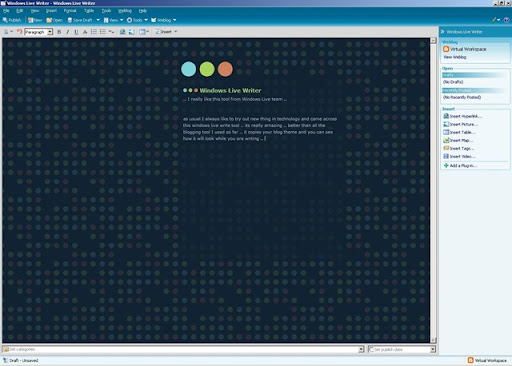
Like you can see on left :-) .. I'm sure that I'll use this one for blogging .. the kind of usability and easiness is there in this tool is amazing .. and it gives you a feeling of your blog .. LIVE .. I would recommend it to all the blogging freak guys out there .. check it out here .. you goona like it .. thanks to Windows Live Team for this ..

Friday, May 9, 2008

Android

.. by Google..

Google has just launched a new SDK for mobile .. Android .. opensource .. and it has been put to developers all around the world to explore .. it comes with a simulater and eclipse plugin to ease the development effort .. check out more here .. you can develop cool apps for you mobile (coding in Java) .. I just finished "Hello Android" .. it looks good .. and the emulater is a nice one :-) ..

There is also a Android Developer Challenge launched .. motivating developer's to explore the sdk as much as they can .. and the motivating factor is .. this challenge will give $10 million in awards :-) .. Race is ON guys .. jump in and show your skills !!!

Can not see desktop icons neither can right click on desktop - Linux

.. I installed linux on my office desktop few months ago.. things were kewl and I was excited as I have a windows laptop and linux desktop .. so now I can enjoy working on both .. it went smoothly till I started facing this problem .. suddenly one day I can't see my desktop icons neither I can right click on my desktop .. also I can't browse any folder in GUI mode .. i have to have to use terminal :-(

Tried lot of things .. searched Google .. no luck :-( and today I found in one of our internal forum regarding "gconf-editor" :-) .. thats was my best shot .. i installed it and followed the steps:

Under apps/nautilus/desktop, ending with '=icon_visible" ..

and I can not see anything under apps/nautilus/desktop :-( :-( :-( .. then I searched for nautilus in our internal repository and installed few of the libs (few were already installed) .. now I can see something (infact many things :-D ) under apps/nautilus/desktop .. I just left things to default and restarted my box .. and bingo! it worked .. I can see desktop icons and all .. "Nautilus is a file manager for GNOME .. seems like it was currupted :-D" .. I heared people saying ur X is currupted etc etc .. but nothing like that .. my desktop is feeling much better now :-D .. c ya..